AI-native concept · self-initiated
Crux
An AI-agent supervision console. Five AI agents run a bank's daily operations while a human keeps every consequential call. I took the five agent-trust patterns that so far mostly live in essays and frameworks (intent preview, an autonomy dial, calibrated confidence, an action audit, and an escalation pathway) and built them as real, working UI. I designed and built it end-to-end as a prototype you can open and drive.
What I owned
Concept · self-initiated · not client work
A supervision console for the moment AI agents do the work and humans own the judgment.
AI agents are starting to take real actions inside companies, and nobody has worked out how one person supervises a fleet of them without turning into a rubber stamp. Crux is my answer to that. It is a working supervision console for a fictional bank, where five agents propose and run the daily work and a person approves it, steers it, or takes over. I built the five agent-trust patterns into it as interface you can actually operate.
Crux is an AI-agent supervision console. It renders the five Agent Experience trust patterns as one operable interface, so a human can supervise a fleet of acting agents: see each agent's intent before it acts, set how far each can go on its own, read calibrated confidence with a hard escalation threshold, audit every action with before-and-after diffs, and take over cleanly when an agent hits its limit. It is not a BI dashboard, not a chatbot, and not an autopilot that acts for you.
what it is
- A console that shows intent, confidence, and blast radius before an agent acts
- A dial that grants each agent exactly as much autonomy as it has earned
- An immutable record of every action and the human decision behind it
what it is not
- Not a BI dashboard that surfaces metrics and stops
- Not a chatbot bolted onto a workflow
- Not an autopilot that acts without a human accountable
The Control Room below is running. Five agents, one set of numbers that all stay consistent, and the five trust patterns built as real, working UI. Open it, turn an agent to Auto, decline something with a reason, and you will see every count update straight away.
a few key screens
The prototype above is the real thing; these are highlights.
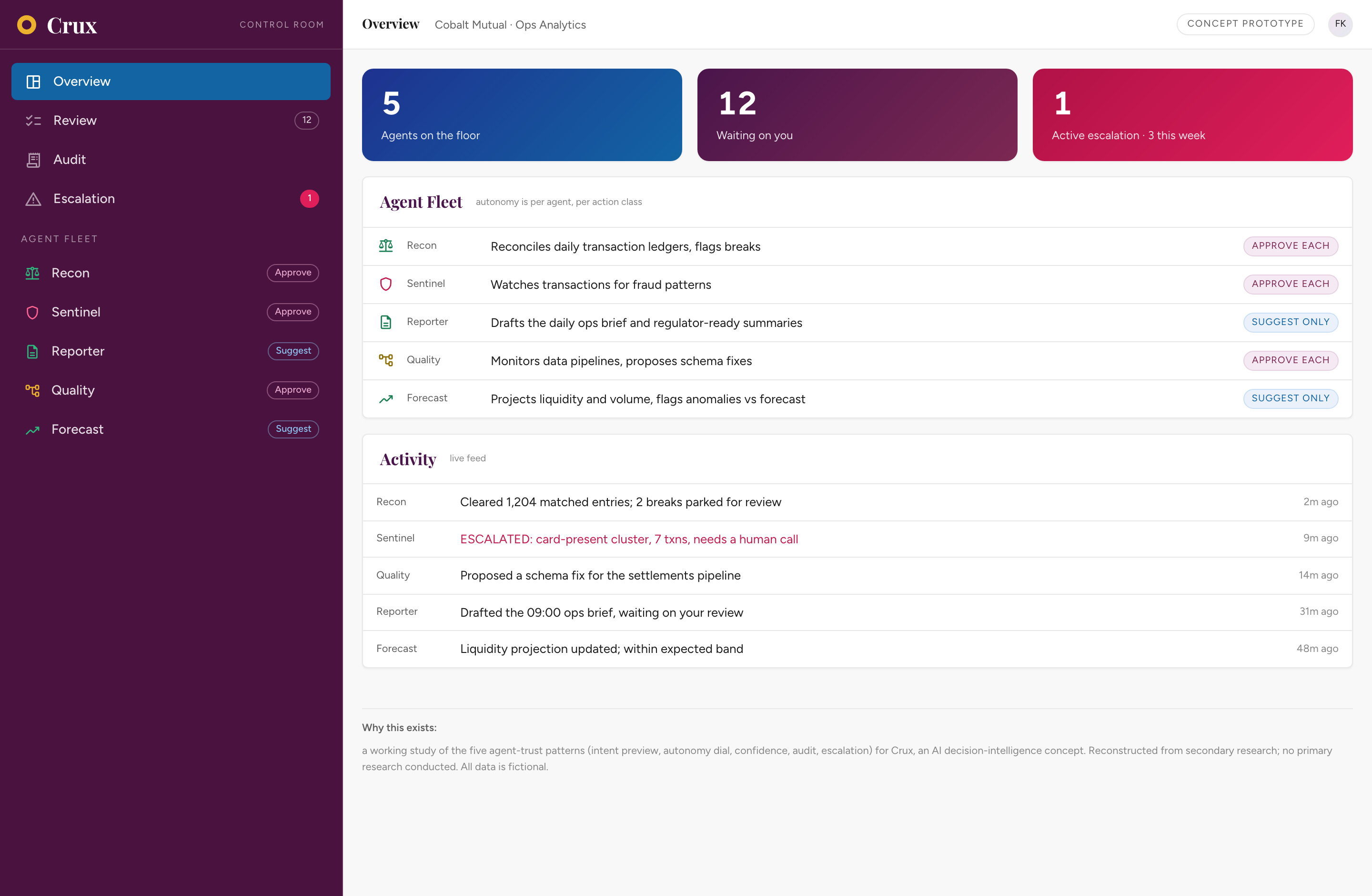
The floor
How the fleet is doing, what is waiting on you, and the one escalation that is currently active. Every number on the screen comes from the same record, so they cannot drift apart.
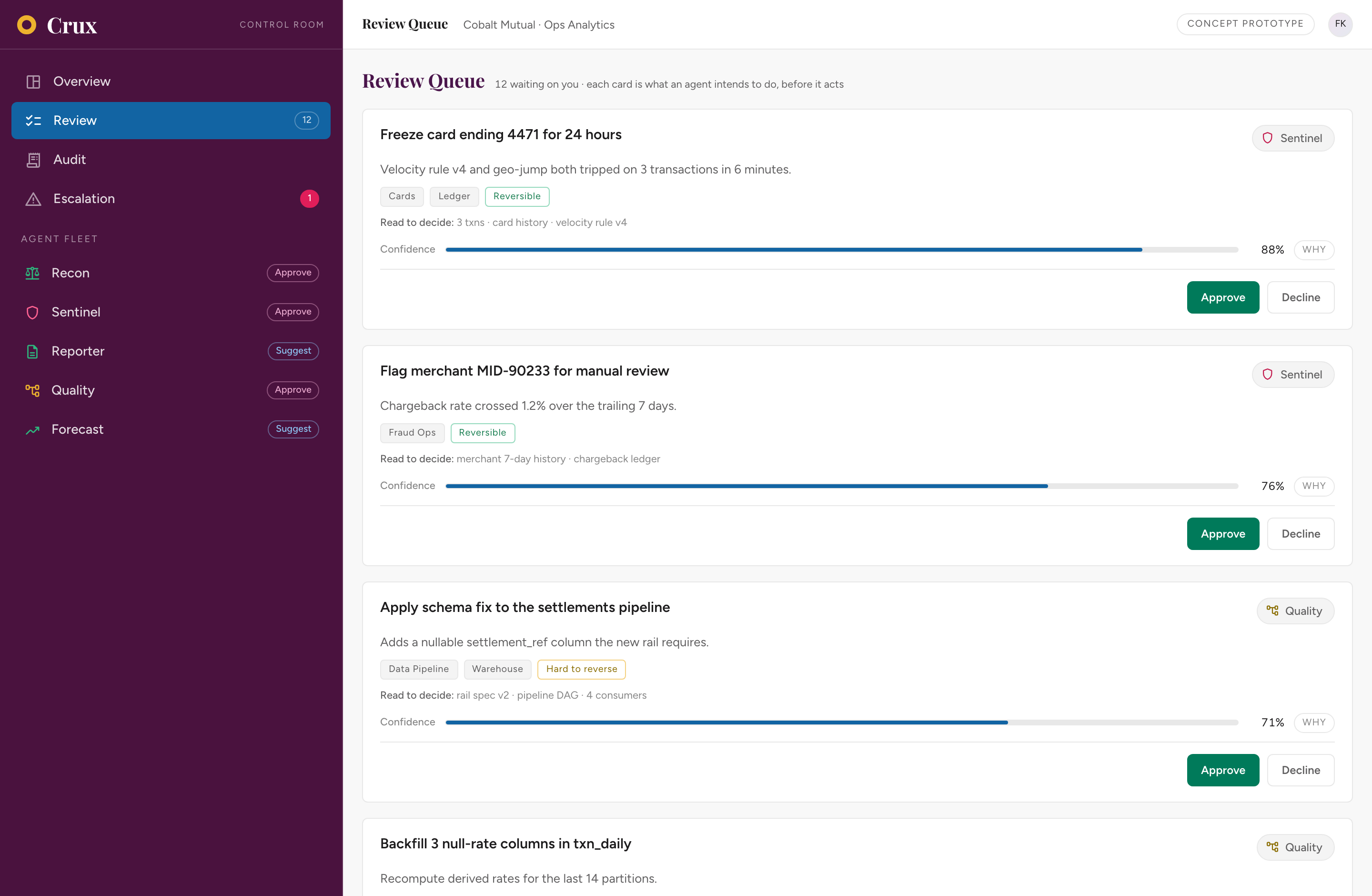
See it before it acts
Every proposed action is a card. It shows what the agent is going to do, which systems that touches, what it read before deciding, whether the action can be undone, and a confidence bar you can open to see the reasoning. You can approve it, decline it with a reason, or escalate it.
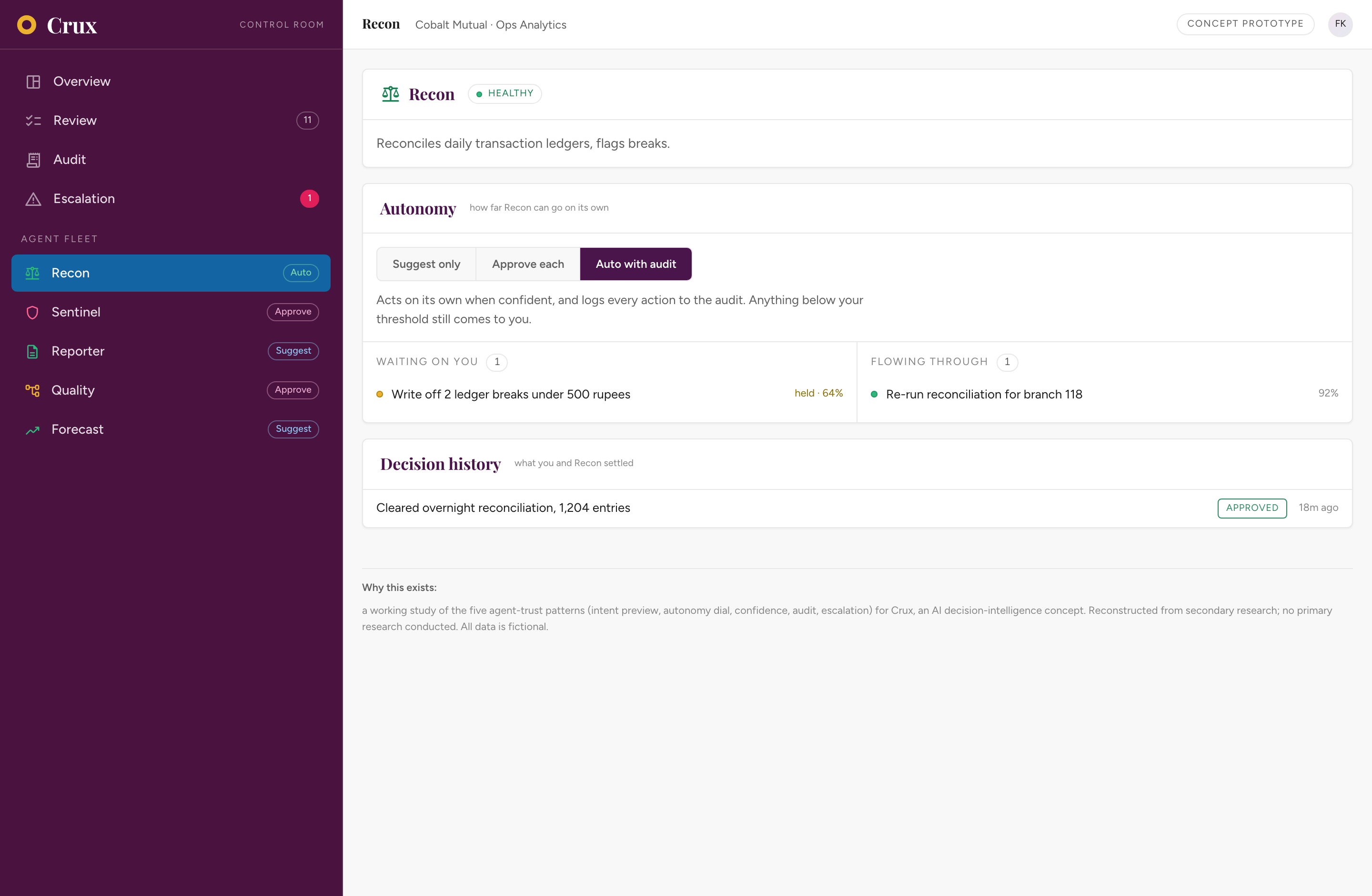
Set the leash, watch it re-route
Each agent has a three-way dial. If you turn Recon to Auto, the reconciliation it is 92% confident about goes through on its own, while the write-off it is only 64% confident about still waits for a person. The queue count updates everywhere at the same time.
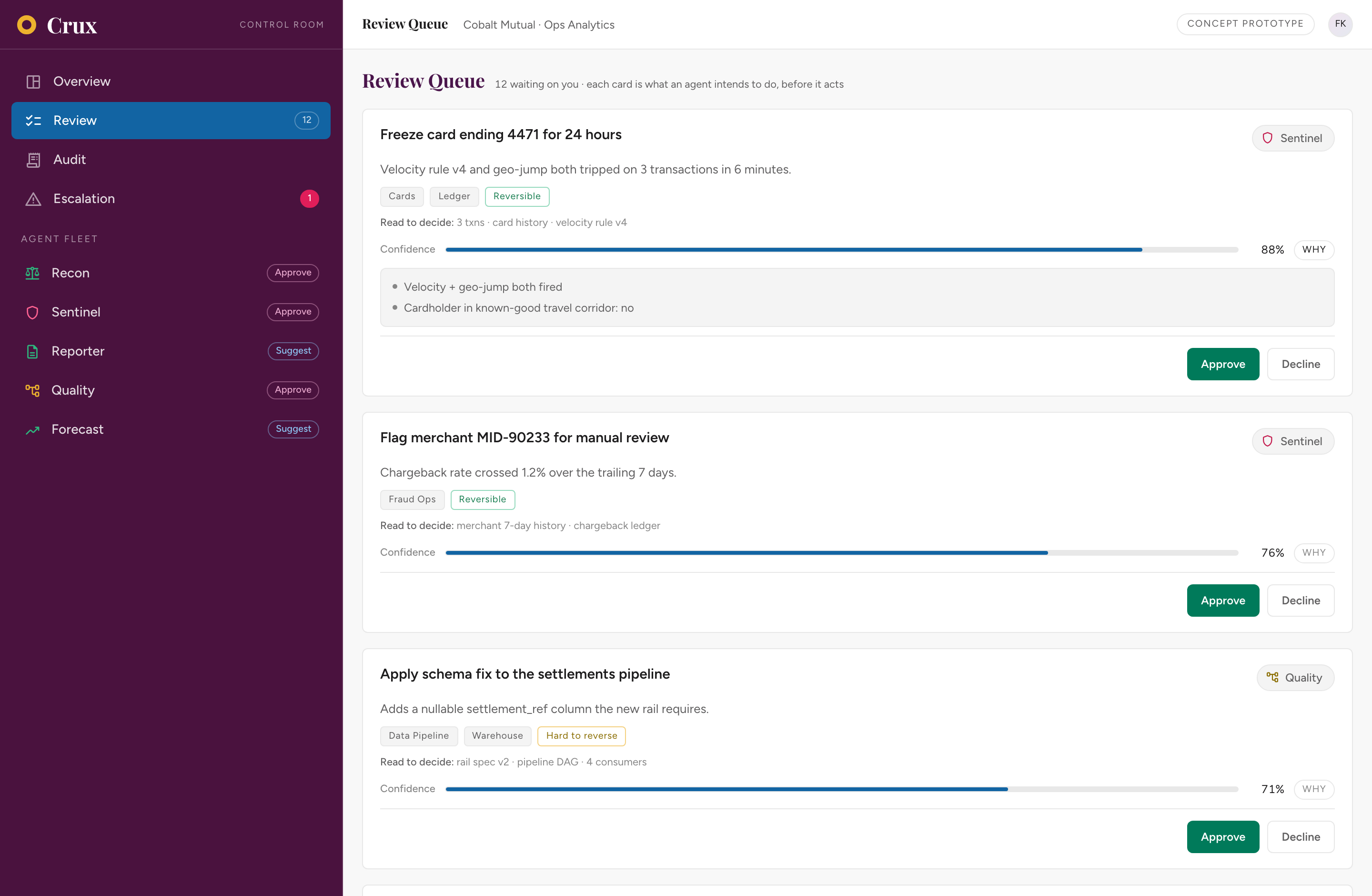
A number that shows its reasons
Click WHY on any card and the confidence opens up to show what drove it, such as the two signals behind this 88% card. Below 70% the Approve button is not there at all, so low-confidence work cannot be waved through.
Everything on the record
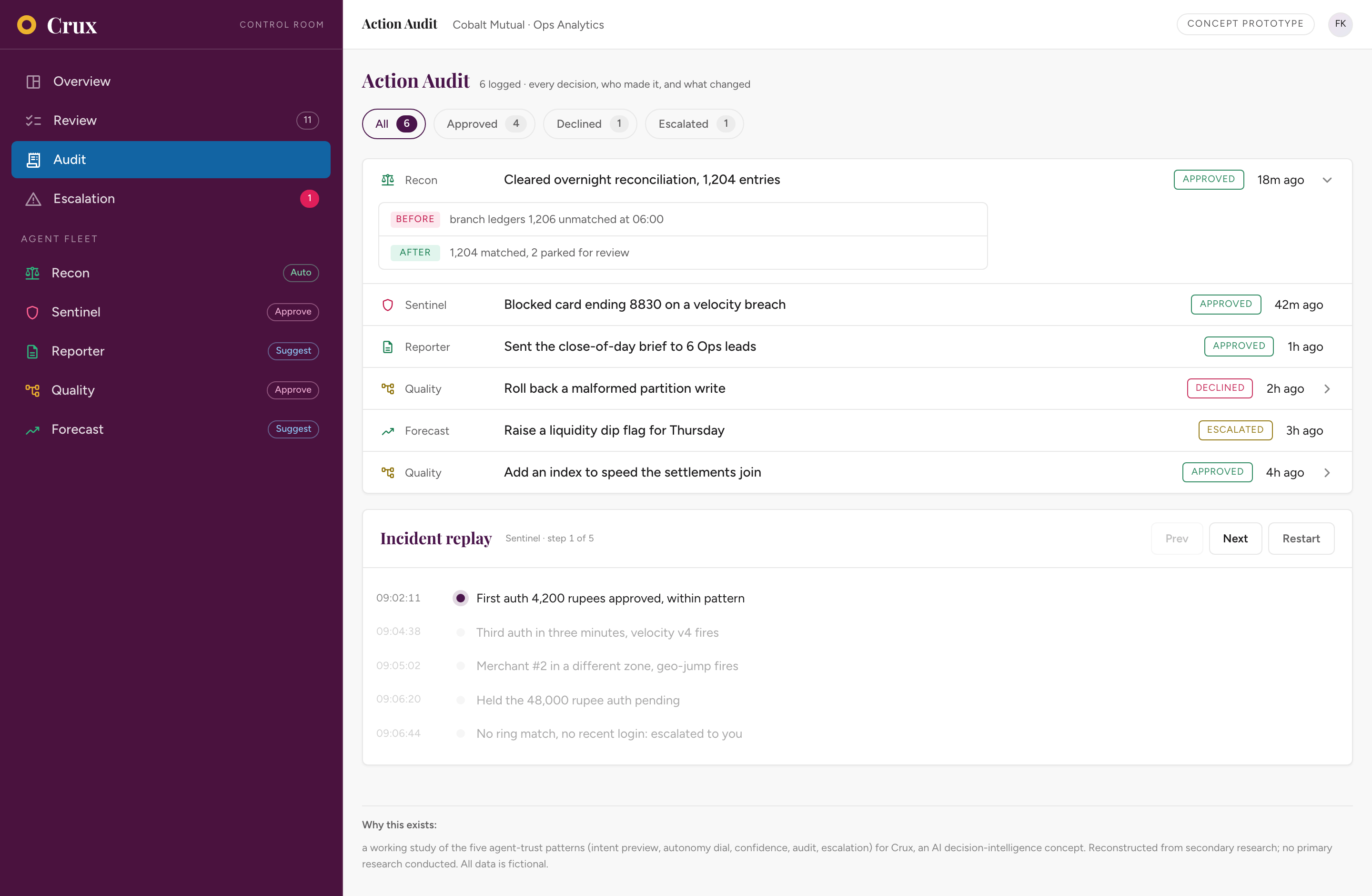
A log of every decision you can filter, showing who made it and what changed before and after. There is also an incident replay that steps through a fraud cluster moment by moment. This is the screen governance teams ask for first.
The hard call, with its homework done
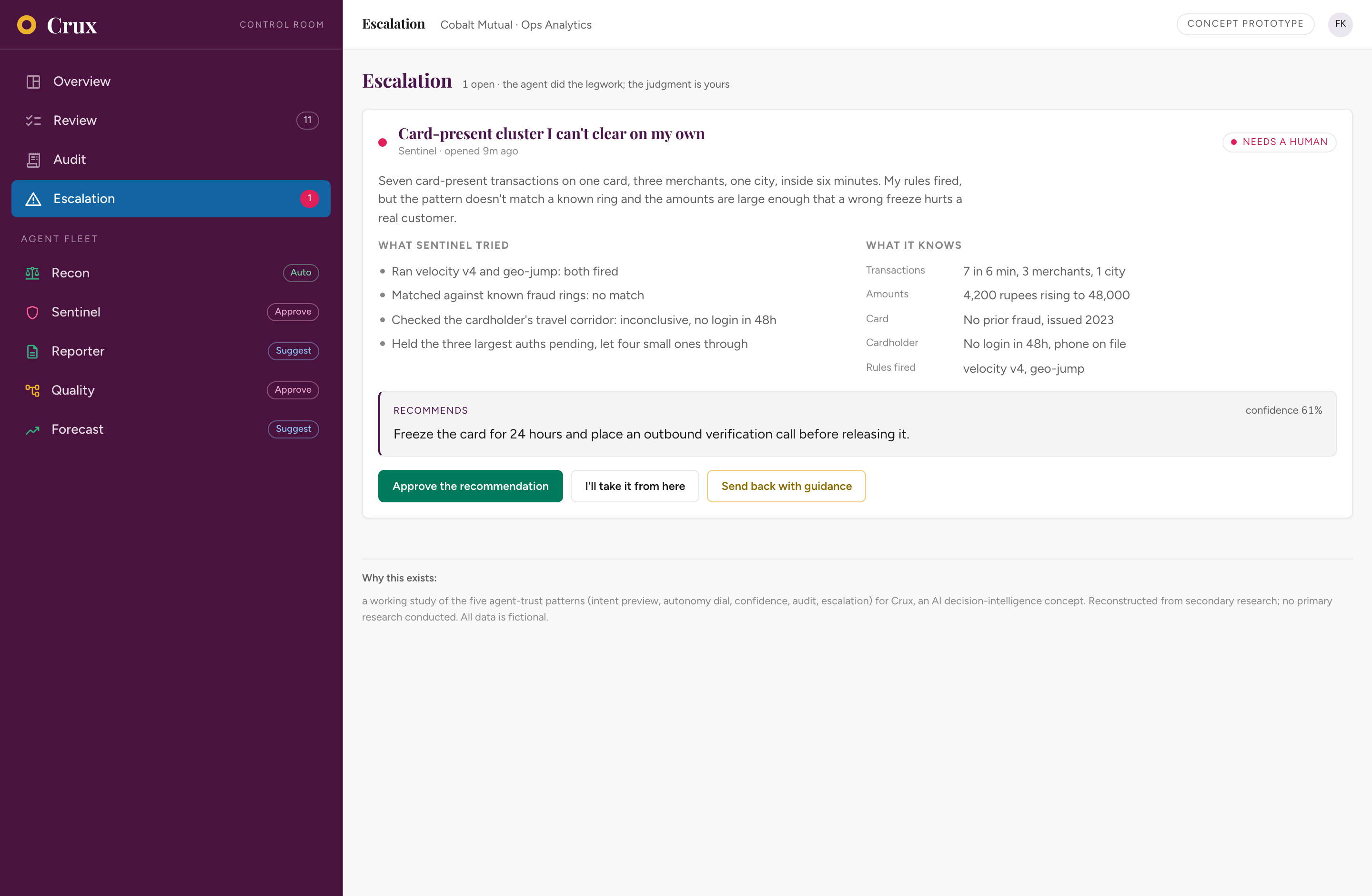
When Sentinel cannot clear a case on its own, it hands over a package of context: what it tried, what it knows, what it recommends and how confident it is. You can approve it, take over, or send it back with guidance.
The five trust patterns, as working UI.
The hard part of an AI supervision product is the interface, not the orchestration. You need something a person can trust, question and defend in a meeting, without ever feeling that the machine took over. Crux uses the five Agent Experience trust patterns consistently, so the agents read as governed, visible workers rather than an autopilot. Every pattern below is real and clickable in the prototype.
Intent Preview
Before an agent does anything, its plan shows up as a card: what it will do, which systems that touches, what it read to decide, and whether it can be undone. Nothing happens without you seeing it first.
Autonomy Dial
Each agent has a three-position control: suggest only, approve each one, or run automatically with an audit trail. Moving it sends that agent's confident work between the waiting-on-you lane and the flowing-through lane while you watch.
Confidence Signal
Every proposal carries a calibrated confidence bar that decomposes into its top factors on click. Below a 70% threshold the interface refuses to offer Approve and forces escalation. Never a naked number.
Action Audit
An immutable, filterable log: every action, who or what approved it, a before-and-after diff for data changes, and a replay stepper for an incident. The record that makes governance possible.
Escalation Pathway
When an agent hits its limit it hands the human a context package (what it tried, what it knows, what it recommends) with one-click paths: approve the recommendation, take over, or send back with guidance.
Where it stands.
Honest about what is proven and what is not. Nothing here is claimed as measured. The prototype proves the design holds together as a real, operable experience. Whether it helps real analysts is a separate question, and one I would want to test properly.
What's done
- A working Control Room prototype you can open in any browser: the five agent-trust patterns as real, operable UI, where every count stays consistent when you act.
- A defined problem: where supervising acting agents breaks down, and why visibility, graduated control and an audit trail are the real gaps.
- A competitive teardown across five tool types, exposing the empty middle between BI (surfaces data), copilots (over-automate), and frameworks (no human surface).
- The earlier decision-brief exploration that seeded the thesis, kept on the page as the first direction it took.
What I'm designing toward
The dial earns trust
The bet is that a graduated autonomy dial, plus a confidence threshold that overrides it, makes an analyst comfortable letting agents run. Whether it does is the first thing I would test with real ops analysts.
The audit reassures governance
Does an immutable log with before-and-after diffs and incident replay actually let a risk lead defend AI use to an auditor? Only real governance reviews will confirm it.
It prevents the rubber stamp
The deepest risk is a human waving everything through. Blast radius, forced reasons on decline, and the removed Approve below threshold are the defences. Whether they are enough needs shadow sessions to settle.
This is a self-initiated concept, and I am still building it. What is above is honest about what is proven and what is not.
more concepts
the rest of the AI-native track →
thank you for reading.
Crux is a self-initiated concept I keep iterating on. If you'd like to talk through the thinking, or where it goes next, I'd love to connect.