AI-native concept · self-initiated
slate
An AI recruiting workspace for staffing agencies. The system sources, ranks, and drafts the outreach, and the recruiter stays the decision-maker. I designed it end-to-end from desk research to a working, clickable prototype, with AI trust at the centre: confidence scores and clickable provenance.
An AI recruiting workspace for staffing agencies, built around how recruiters actually work.
TL;DR / Concept Summary
A recruiter's day is a tab-juggling act: an ATS, LinkedIn, three job boards, a spreadsheet, two inboxes, and somewhere in the middle, a person to actually call. The job stopped being recruiting and became data entry. Recruiters now lose 40%+ of their time to non-recruiting work like updating systems and writing status reports (Aqore, 2026). Slate rebuilds the desk around one idea, the project rather than the tool, with an AI copilot underneath that sources, ranks, drafts the outreach, and writes the client update. The catch I cared about most: the AI never sends anything. It proposes, the recruiter decides. Every suggestion shows its confidence and links back to where it came from. I built this from desk research, not a brief. It's a real, documented problem, re-framed and designed end to end, through to a working interactive prototype.
Concept · self-initiated · not client work
Type
AI-native product concept
Role
Sr. UX Lead (end-to-end)
Basis
Secondary research + teardown
Platform
Responsive web · desktop-first
Status
Concept + working prototype
process
Slate is a self-initiated concept, not a client engagement. I chose agency recruitment because it's one of the last knowledge-work domains still run on a patchwork of single-purpose tools, and because it's a genuine test of AI-trust design: recruiters will not hand decisions to a black box, but they badly need the leverage AI can give them. The interesting design problem isn't 'add AI.' It's 'add AI a sceptical professional under time pressure will actually trust.'
I didn't sit beside a recruiter for this. It's a self-initiated concept, and I'd rather show the reasoning than claim research I didn't run. The problem is reconstructed from the public record: industry time-studies, the complaints in recruiting communities, agency job descriptions, and the gaps reviewers flag in the incumbent tools. The picture that emerges is consistent and quietly expensive, and it's what the whole design answers to.
Why this concept
Three reasons. It's a domain where AI offers real leverage but trust is the gating factor. Its project-centric structure is a genuine information-architecture problem rather than a reskin of an ATS. And it lets the case study show a visibly different process, research-led and workflow-shaped, from a survey-driven or a high-stakes-decision project.
Three people, one broken workflow.
These aren't interview subjects. I didn't interview anyone for a self-initiated concept, and I won't pretend I did. They're archetypes built from public material: recruiting forums, agency job descriptions, product reviews of the incumbent tools, and published industry research. They're who the research points to. The recruiter is the primary user; the other two shape what 'good' has to mean.
Meera Joshi
Agency Recruiter · primary
Runs 8–12 open roles at once across 3–4 client accounts. Lives in her inbox, LinkedIn, and the ATS, usually all at once. Resents all three.
goals
- Get a qualified shortlist in front of the client before a competitor does
- Stop wasting hours screening candidates who were never a fit
- Look on top of every account without working until midnight
frustrations
- Re-enters the same candidate data into three different tools
- Loses pipeline context every time she switches accounts
- Spends evenings writing client status updates by hand
jobs to be done
“When I take a new role from a client, I want a qualified shortlist in front of them fast, so I can fill it before a competitor does.”
ATS · LinkedIn Recruiter · Gmail · WhatsApp · 2 spreadsheets
Daniel Okafor
Agency Owner
Runs a 14-person agency. Watches margin leak into a stack of tools that don't talk to each other. The research pegs that leakage at 15–25% (Aqore, 2026).
goals
- Keep relationships and pipeline knowledge when a recruiter leaves
- See where every role actually stands without chasing people
- Protect margins by cutting time-to-fill
frustrations
- When a recruiter quits, months of pipeline and client context walk out the door
- No single view of the agency's real status, because it lives in inboxes
- Reporting is a Friday-afternoon scramble of copy-paste
jobs to be done
“When a recruiter leaves, I want their relationships and knowledge to stay in the business, so I don't lose months of pipeline.”
ATS exports · spreadsheets · the team's word
Priya Raman
Client · Hiring Manager
A hiring manager at a client company, briefing 2–3 agencies on the same role and judging them on speed and signal.
goals
- Get a small, high-signal shortlist, not a flood of CVs
- Understand why each candidate was put forward
- Know where the role stands without sending a chasing email
frustrations
- Agencies send volume to look busy, not signal
- No rationale attached to candidates, just a CV and a name
- Has to ask for a status update every single time
jobs to be done
“When I brief an agency, I want a small shortlist with clear reasoning, so I can trust the recommendation and move fast.”
Email · the agency's PDF shortlist
A day at the desk, reconstructed from the research.
Reconstructing the desk
To design the workflow, I mapped how an agency recruiter actually spends a day. Not from sitting beside one, but from the public record: industry time-studies, the complaints in recruiting communities, and the feature gaps reviewers call out in the incumbent tools. Three things came up over and over.
Basis
Secondary research
Sources
Time-studies · forums · tool reviews
Mapped
Tool touches + context switches
Output
The day the tools created
A day in the life, rebuilt
Reconstructed from the research, one recruiter's day shows where the time actually goes. The work that creates value (talking to people, judging fit) gets crowded out by the work of keeping systems in sync.
- 9:00Triage
Inbox + WhatsApp + 2 ATS tabs open before the first coffee. Rebuilds yesterday's context from memory.
- 10:30Sourcingpain point
LinkedIn, copy candidate, paste into ATS, paste into a tracking sheet. Same data, three homes.
- 12:00Screening
Reads CVs back-to-back with no way to compare them side by side. Gut-ranks in her head.
- 14:00Account switchpain point
Moves to a different client. Loses the thread of where the morning's role stood.
- 15:30Outreach
Writes near-identical LinkedIn messages one at a time, personalising by hand.
- 17:00Client updatepain point
Hand-writes a status email per account from memory and the spreadsheet. The day's least-valued, most-dreaded task.
- 18:30Still here
Admin, not people. The leverage work never happened.
What the research clustered into
The recurring problems from the research grouped into four themes. Each one is a place where the workflow leaks time or trust.
The tool tax
Agency recruiters run across 5–12 separate tools with no shared context. The same candidate gets typed in four times; nothing syncs.
The admin sinkhole
40%+ of a recruiter's time goes to non-recruiting tasks: data entry, scheduling, status reports. Time-to-hire has crept to 44 days.
Volume over signal
Pressure to look busy pushes recruiters toward sending CV volume instead of a reasoned shortlist, which clients quietly resent.
The memory leak
Relationships, client quirks, and pipeline context are individual, not institutional. When a recruiter leaves, the business loses it.
Three insights that drove the design
The job isn't sourcing, it's judgement
Recruiters add value by judging fit and managing relationships. Sourcing and admin are necessary friction. AI should absorb the friction and amplify the judgement, never replace it.
→ AI proposes, recruiter disposes (Principle 1)
The unit of work is the engagement, not the candidate
Recruiters think in roles and accounts, but tools are built around candidate records or job postings. The mental model and the IA are misaligned.
→ Project-centric architecture (Principle 2)
Trust is earned by showing your work
A sceptical professional won't accept an AI score on faith. Every AI output needs a confidence level and a traceable reason, or it gets ignored.
→ Confidence + provenance on every AI output (Principle 3)
★ key insight
Recruiters don't need software that does the recruiting. They need software that does the admin, surfaces the signal, and gets out of the way of the judgement, visibly enough that they trust it.
Why the tools recruiters already pay for don't fix this.
The tool sprawl
I mapped every tool a recruiter touches in a typical week. The picture is the problem: a recruiter is the only integration layer connecting an ATS, a CRM, job boards, LinkedIn, email, a comms app, spreadsheets, and a reporting deck. Manually, all day.
No tool owns the workflow. The recruiter is the glue, which is exactly the job a system should be doing.
Heuristic evaluation of the two incumbents
I ran a heuristic evaluation on the two tools that dominate agency desks, Bullhorn and Recruit CRM, scoring each on six usability heuristics to locate the systemic gaps a new product would have to close.
Competitive teardown
Six tools across the category, scored on eight capabilities. The pattern: incumbents are records systems with AI bolted on; newer point tools do one thing well but don't own the workflow. Nothing combines a project-centric model with trustworthy, end-to-end AI. It's a real opening, with ~20,000 independent staffing agencies in the US alone, most under 20 recruiters.
| Capability | Slate | Bullhorn | Recruit CRM | LinkedIn Rcl | Greenhouse | Loxo |
|---|---|---|---|---|---|---|
| Project-centric model | Yes | No | Partial | No | No | Partial |
| AI candidate analysis | Yes | Partial | Partial | Partial | No | Yes |
| Confidence + provenance | Yes | No | No | No | No | No |
| AI outreach (human-gated) | Yes | Partial | Partial | Yes | No | Yes |
| One-click client report | Yes | No | Partial | No | Partial | No |
| NL search across desk | Yes | No | No | Partial | No | Partial |
| Organisational memory | Yes | Partial | Partial | No | No | Partial |
| Built for the recruiter | Yes | No | Partial | Partial | No | Partial |
The gap statement
No existing tool combines a project-centric workflow model with end-to-end AI that recruiters actually trust. Incumbents are systems of record with AI bolted on; point tools own a feature, not the workflow. The space between them is the opportunity.
The hypothesis.
Positioning
Slate is an AI recruiting workspace for staffing agencies, not HR departments. It organises everything around the engagement and gives recruiters an AI copilot that sources, ranks, drafts, and reports. The recruiter stays the decision-maker on everything that matters. It is not an HRIS, not a job board, and not an ATS with a chatbot stapled on.
what it is
- A project-centric workspace where every engagement is a project
- An AI copilot that does the admin and surfaces the signal
- A system that earns trust by showing confidence + provenance
what it's not
- Not an HRIS / payroll / compliance suite
- Not a job board competing with Indeed
- Not an ATS with an AI chatbot bolted on
The project-centric mental model
The core IA bet: structure the product by engagement, not by candidate record or job posting. Recruiters already think in 'the Acme back-end role,' a project that holds its candidates, outreach, interviews, notes, and the client relationship in one place. Matching the architecture to the mental model is the innovation; everything else follows from it.
Four design principles
Each principle is a tension resolved in a direction, and each one earns its place from the research.
AI proposes, recruiter disposes
Every consequential action is gated behind a human: sending outreach, advancing a candidate, sharing a shortlist. The AI does the work up to the moment of consequence, then hands the decision back.
Trust is the #1 barrier to AI adoption in hiring.
Project-centric over record-centric
Organise by engagement, not by candidate or job. The architecture matches how recruiters already think, so nothing has to be relearned.
The unit of work is the engagement, not the candidate.
Show your work, always
No AI output without a confidence level and clickable provenance. Trust is a feature you build, not a tone you adopt.
A sceptical professional won't act on a score they can't check.
Absorb the admin, amplify the signal
Automate re-entry, summarisation, and reporting; spend the saved attention surfacing what matters. Fast and human, not heavy and clever.
40%+ of the desk's time is lost to non-recruiting work.
How it thinks: architecture & flows.
The recruitment lifecycle, as tasks
Before any IA, I broke the recruitment lifecycle into discrete tasks with their dependencies, so the structure would be organised around the actual sequence of work, not around database tables.
Deriving the structure
With no users to card-sort for a self-initiated concept, and I won't claim a method I didn't run, I derived the information architecture from the problem itself and the project-centric bet. The model is deliberately flat and recruiter-shaped, organised around the engagement rather than the candidate record.
Approach
First-principles from the workflow
Basis
Public research + teardown
Organising unit
The project / engagement
To validate
Card sort with real recruiters (planned)
Three IA decisions
Project as the home base
Chose: Made the project workspace the default landing context, with a global overview above it.
Considered a candidate-database home (rejected, because it's the incumbent model recruiters already route around).
Copilot in the right rail, everywhere
Chose: A persistent AI copilot docked in the right rail so assistance is one glance away in every view.
Considered a separate AI 'mode' (rejected, because it would make AI a destination instead of an ambient assistant).
One ranked-table component, reused
Chose: The same ranked candidate table powers both the workspace and the candidates view: rank · candidate · project · AI fit · status · notes.
Considered bespoke layouts per view (rejected, because consistency lowers relearning and keeps the AI-fit column legible everywhere).
Building it.
low-fidelity wireframes
Low-fidelity, greyscale wireframes first, to lock structure and the AI-trust patterns before any colour or brand. The questions at this stage: where does the copilot live, how does a confidence score read at a glance, and how does provenance expand without burying the decision?
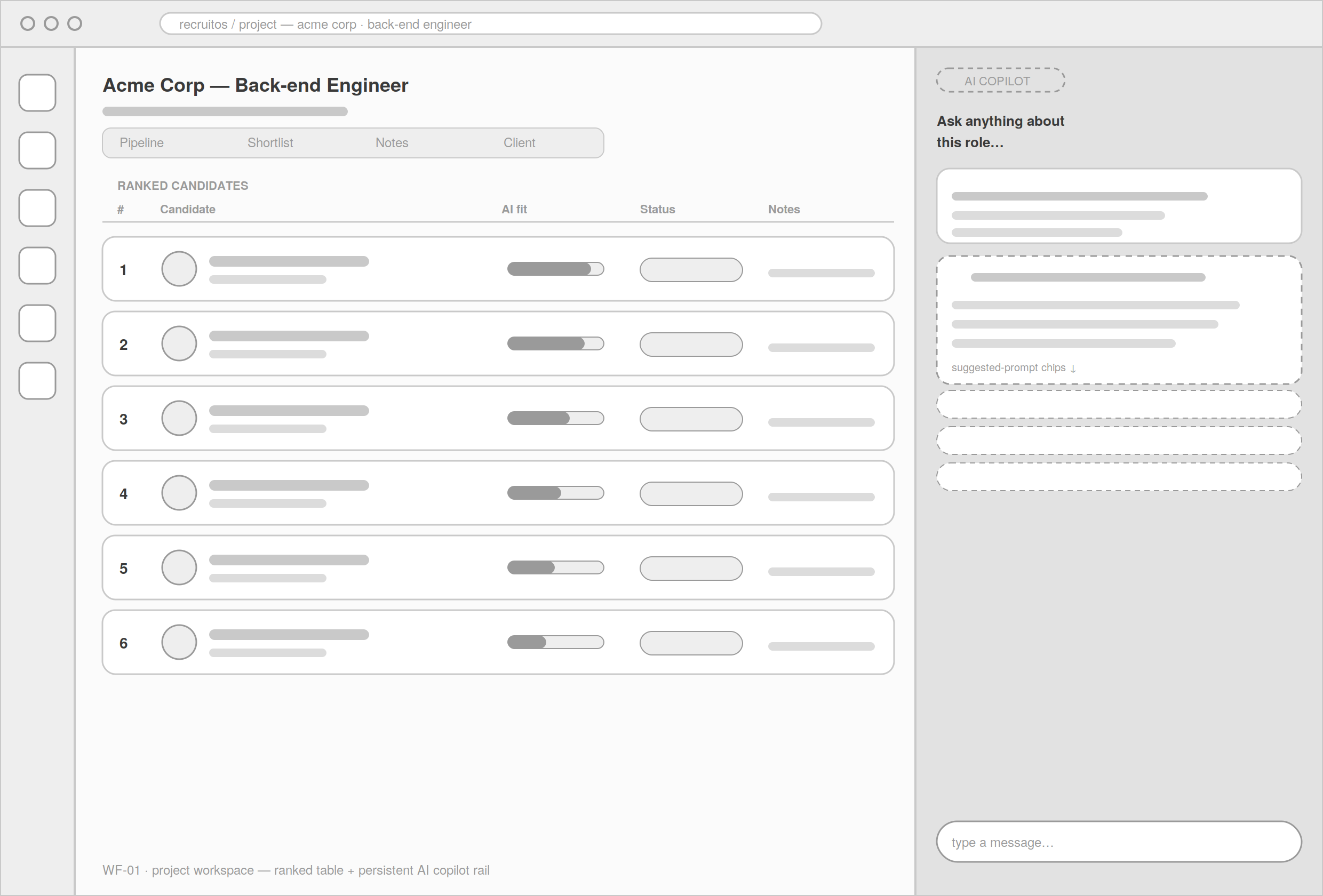
Project workspace
The signature view in greyscale: ranked candidate table left, AI copilot rail right. Locked the two-column relationship and the at-a-glance fit column before styling.
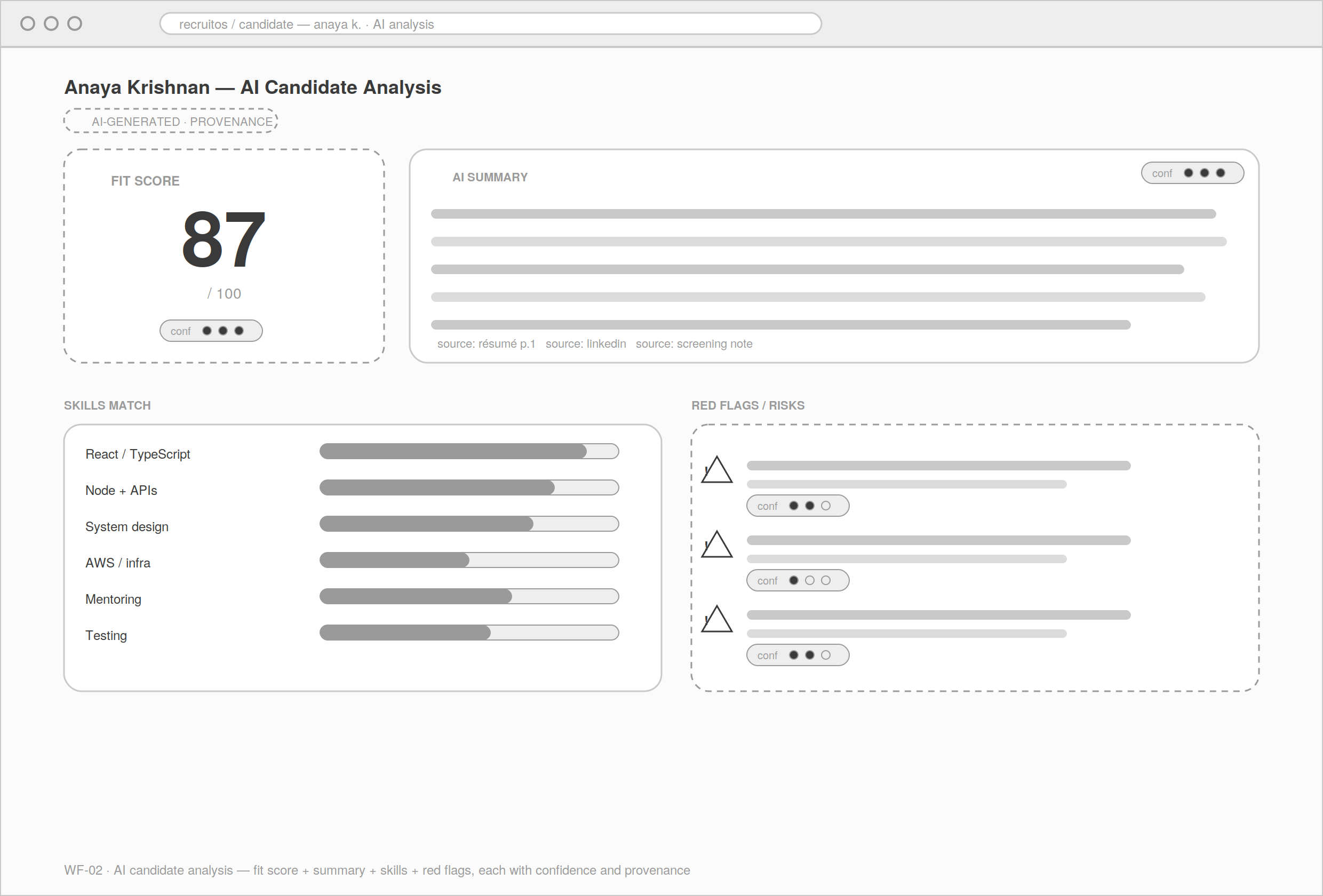
AI candidate analysis
The 'wow' moment, structurally: summary, fit score, skills, and red flags, each with a confidence chip and an expandable 'why'. Provenance as a first-class block, not a tooltip afterthought.
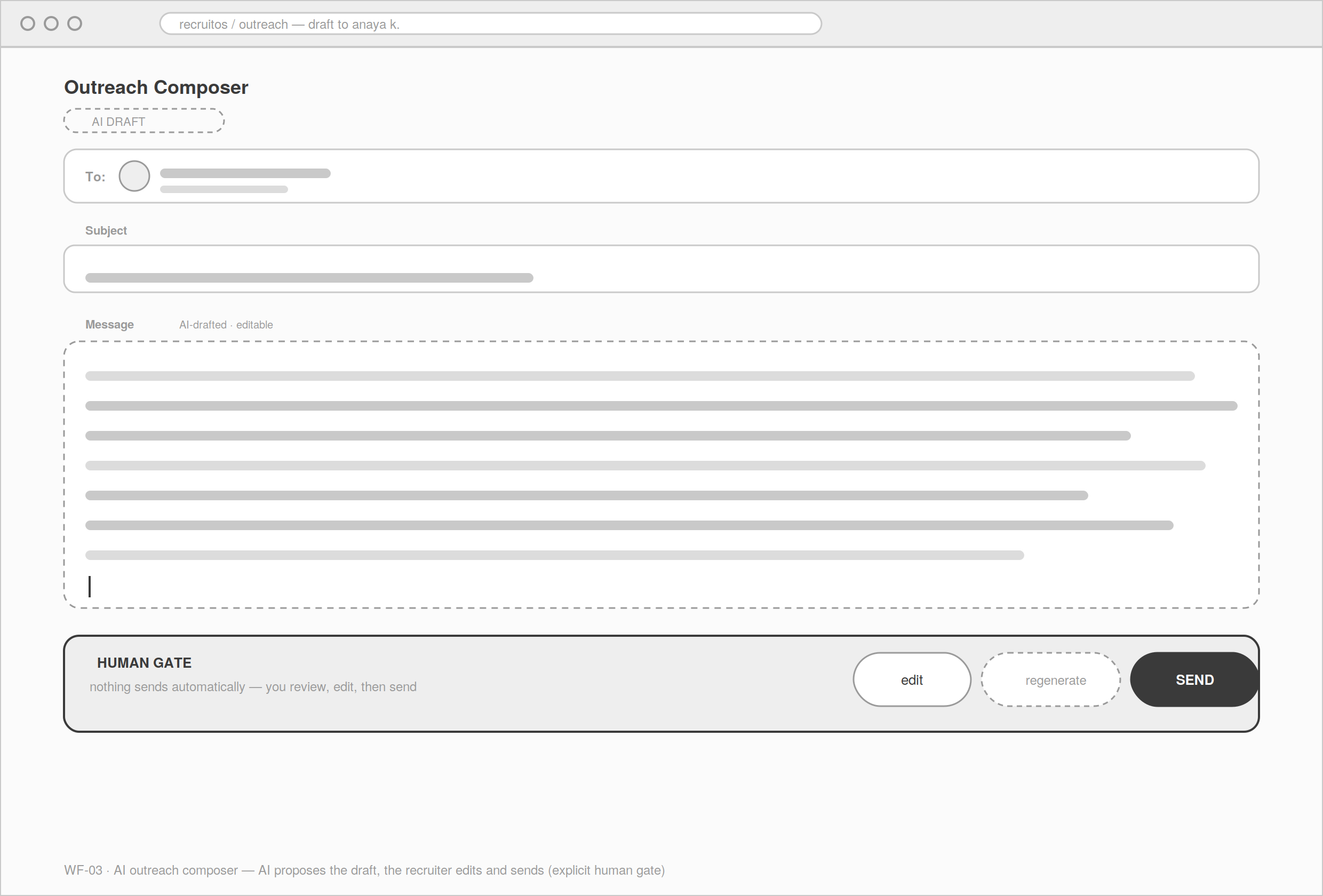
AI outreach composer
AI-drafted message with the human gate explicit. Edit and send are the recruiter's, never automatic. Established the propose-then-approve pattern reused across the product.
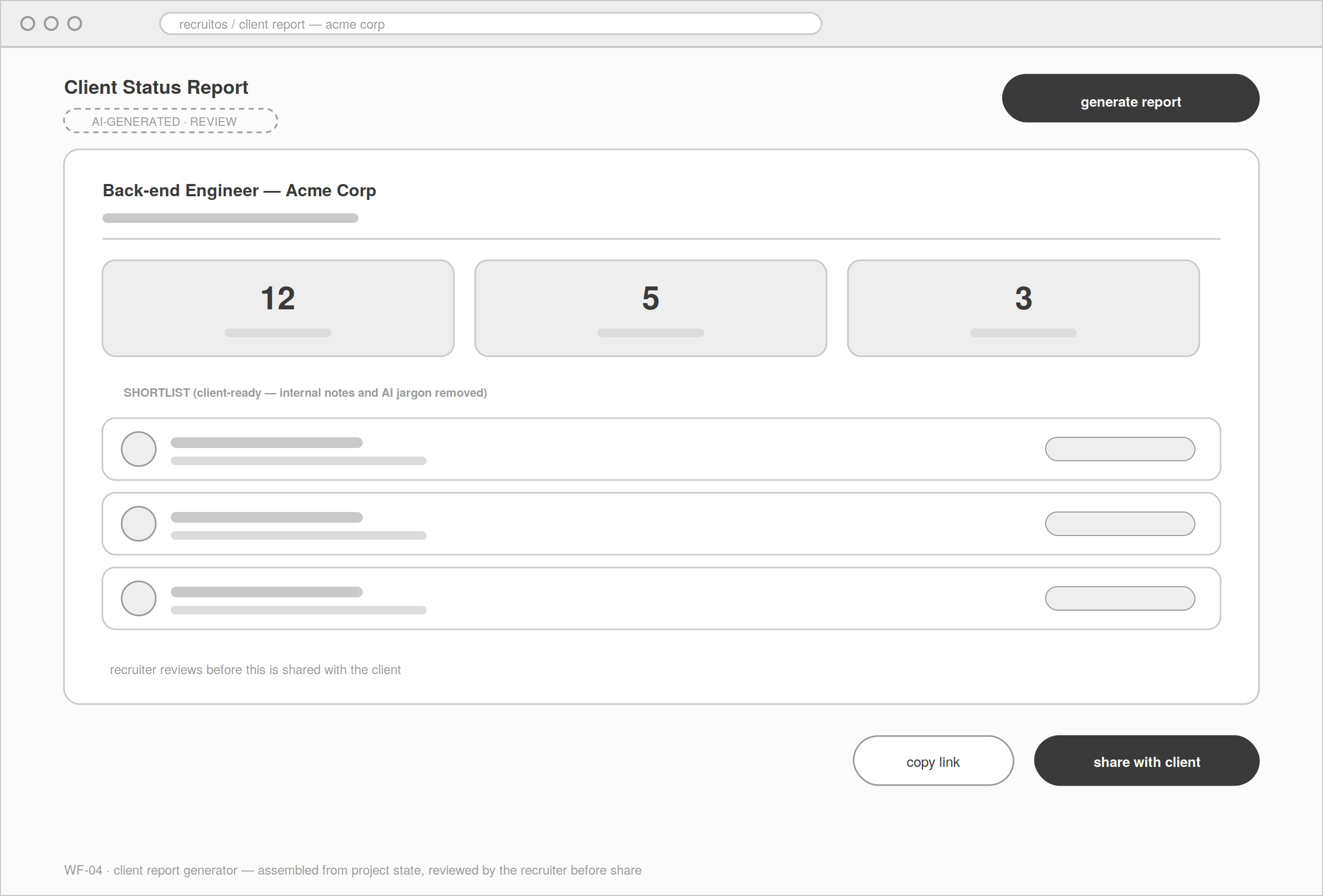
Client report generator
One-click status assembled from project state, with the recruiter reviewing before it's shared. Killed the dreaded Friday copy-paste.
Three core task flows
Three flows carry the product, each with its AI touchpoints and human gates marked. The gates are the point: AI moves fast up to the moment of consequence, then hands the decision back.
Brief → Shortlist
Client opens a role → project created → candidates added → AI analyses & ranks (confidence + provenance) → recruiter curates → shortlist locked. AI touchpoints: analysis, ranking. Human gate: who makes the shortlist.
Candidate → Outreach
Open candidate → AI drafts personalised outreach → recruiter edits → recruiter sends → reply tracked. AI touchpoint: draft. Human gate: edit + send.
Project → Client update
Project state → AI generates status report → recruiter reviews → shared with client. AI touchpoint: generation. Human gate: review before share.
the live prototype
From greyscale to a working, clickable product. The screens below are captured from the live Slate prototype: Google / Material-3 design language, a Gemini-style gradient reserved exclusively for AI surfaces, and the ✦ sparkle marking every AI action. This is not a mock-up of screens; it's the real prototype you can open and click through. It demonstrates intent. It doesn't claim results.
key screens
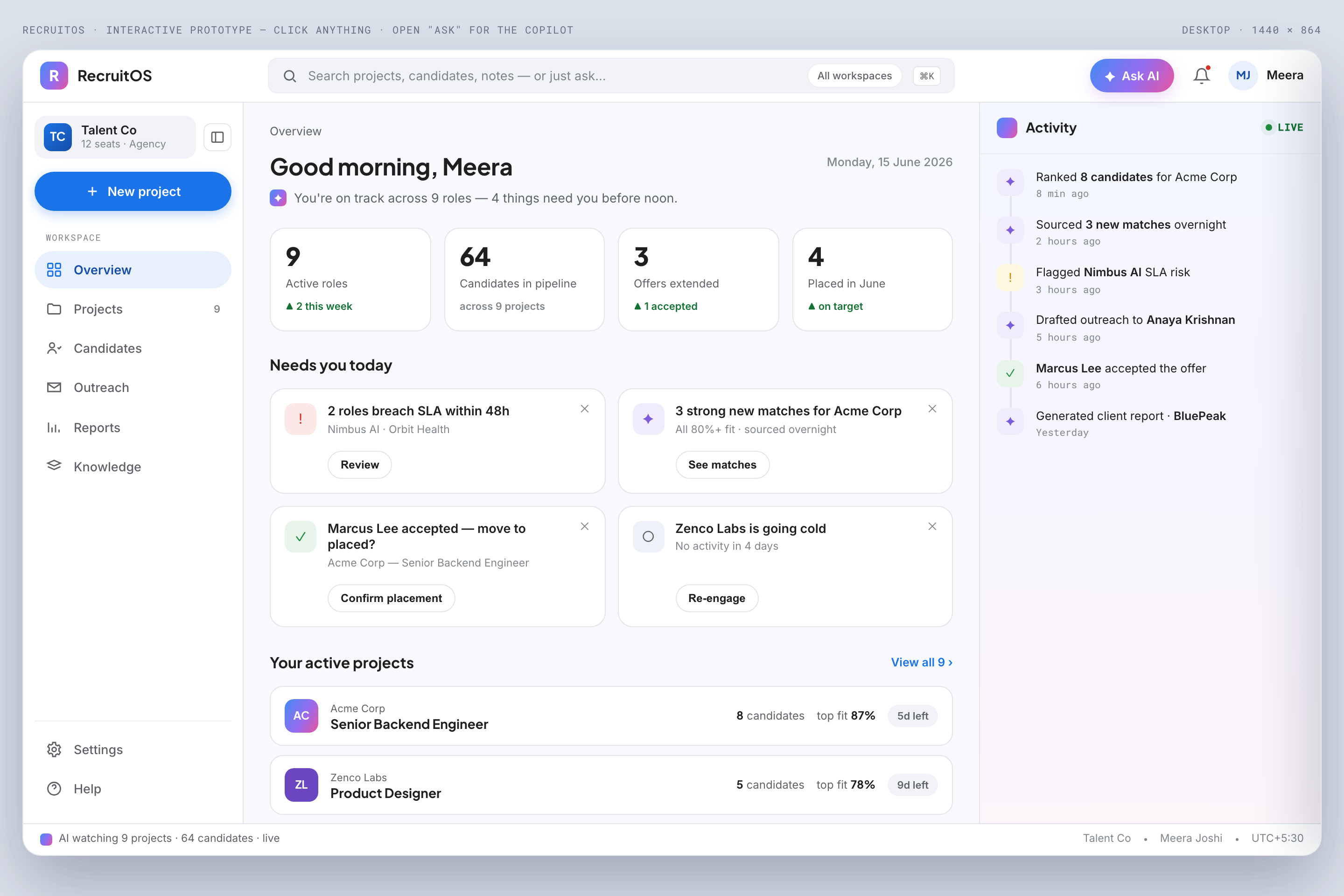
Overview
The agency at a glance: active projects, pipeline health, and what the copilot thinks needs attention today. The global layer above the project workspace.
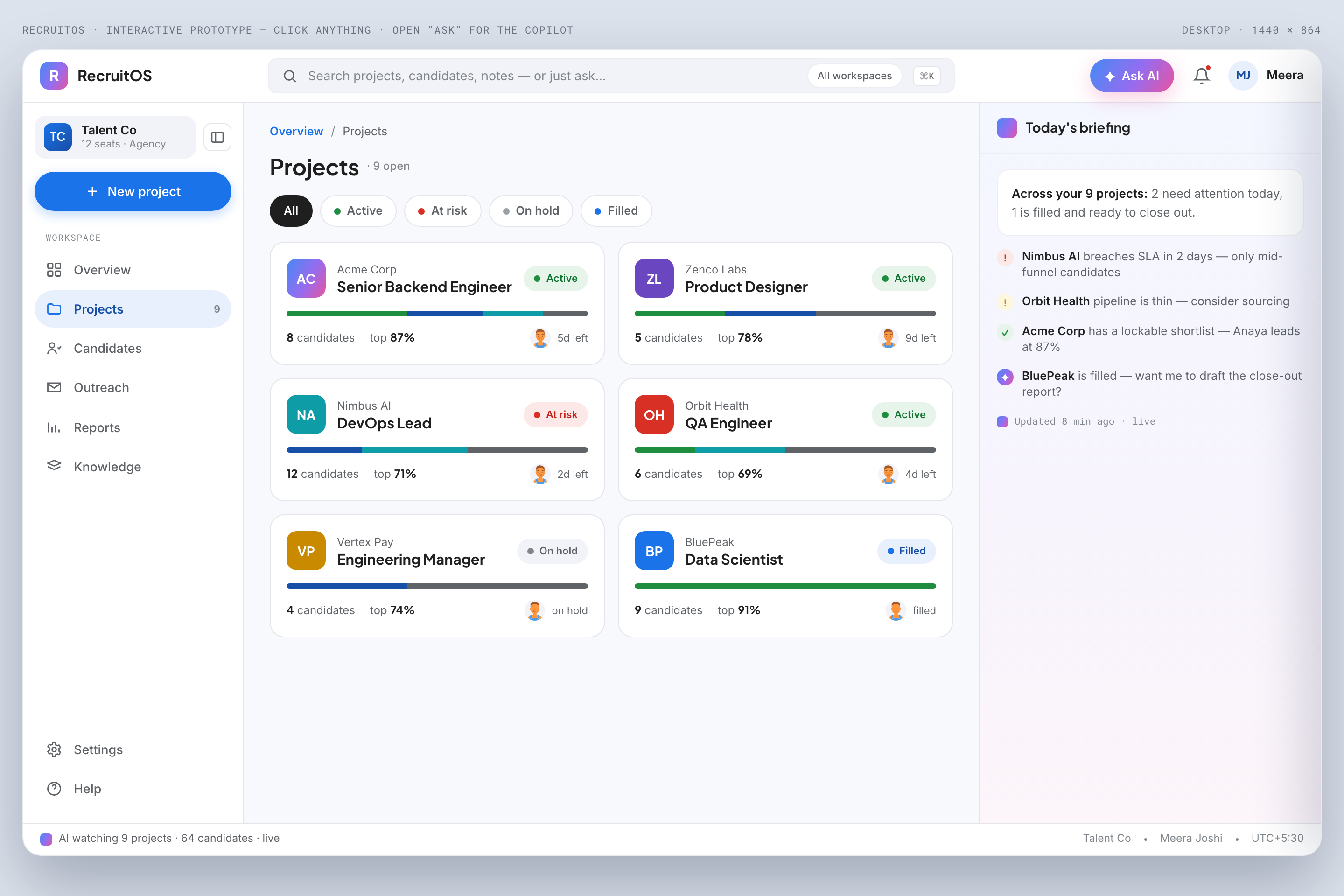
Projects
Every engagement as a project, the home base of the whole product. Status, client, and candidate counts in one scannable list.
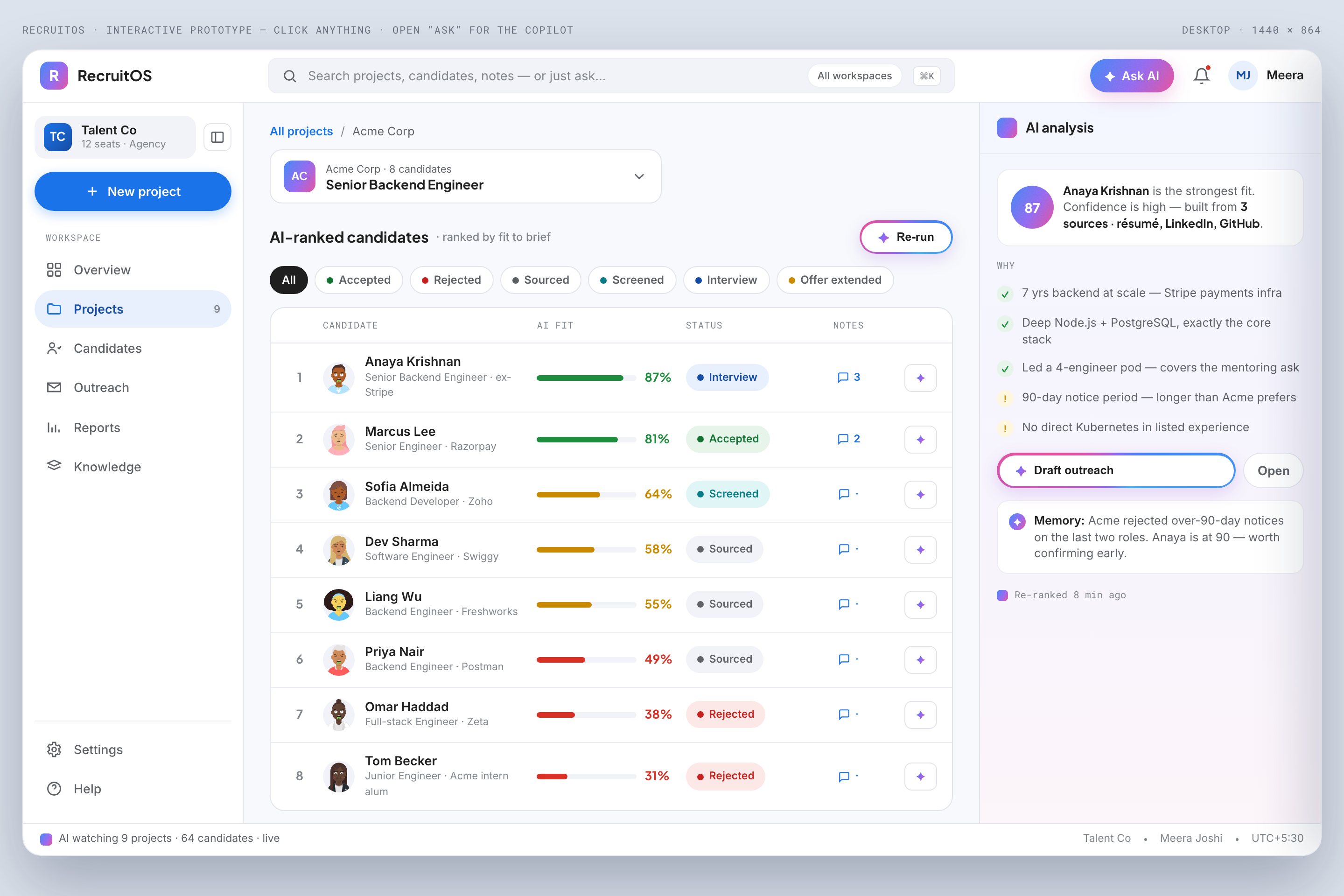
Project workspace
The signature view. Ranked candidate table on the left, AI copilot docked in the right rail. Assistance one glance away, never a separate mode.
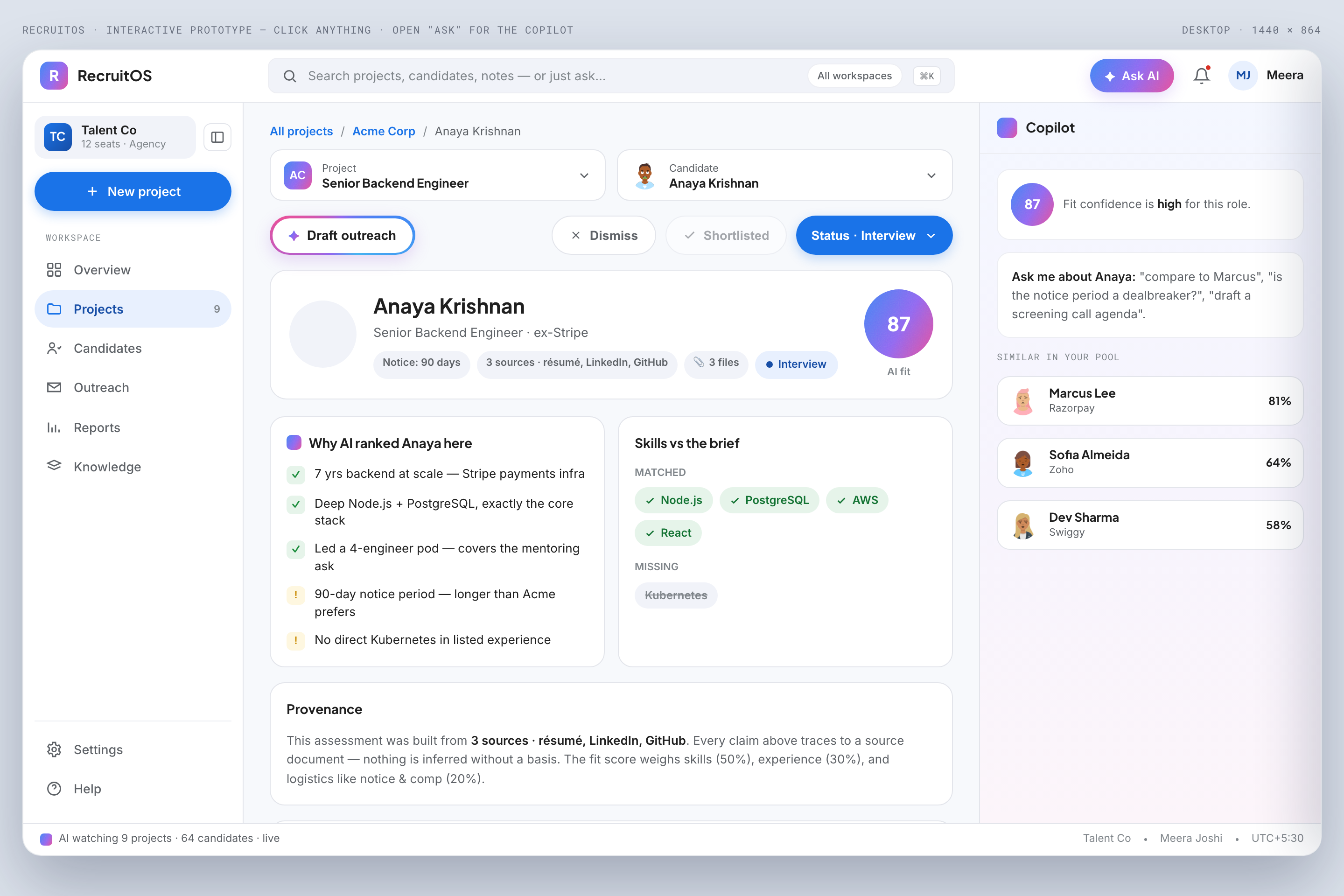
AI candidate analysis
The trust centrepiece. Fit score, skills, and red flags, each carrying a confidence level and clickable provenance, so you can see exactly why the AI said what it said.
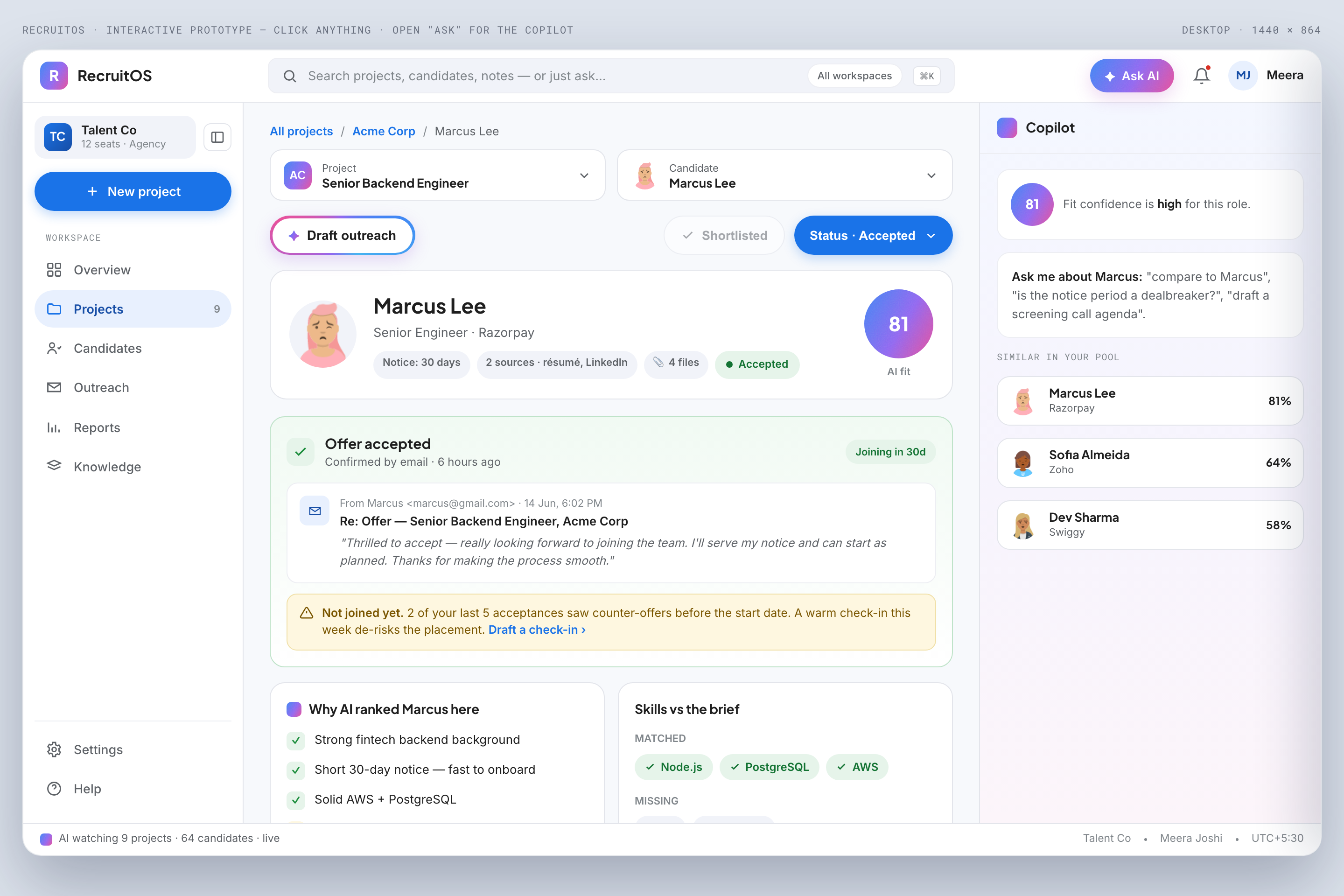
Candidate detail
The full structured profile built from a resume or a pasted profile. AI summary up top, evidence underneath, every claim traceable to a source.
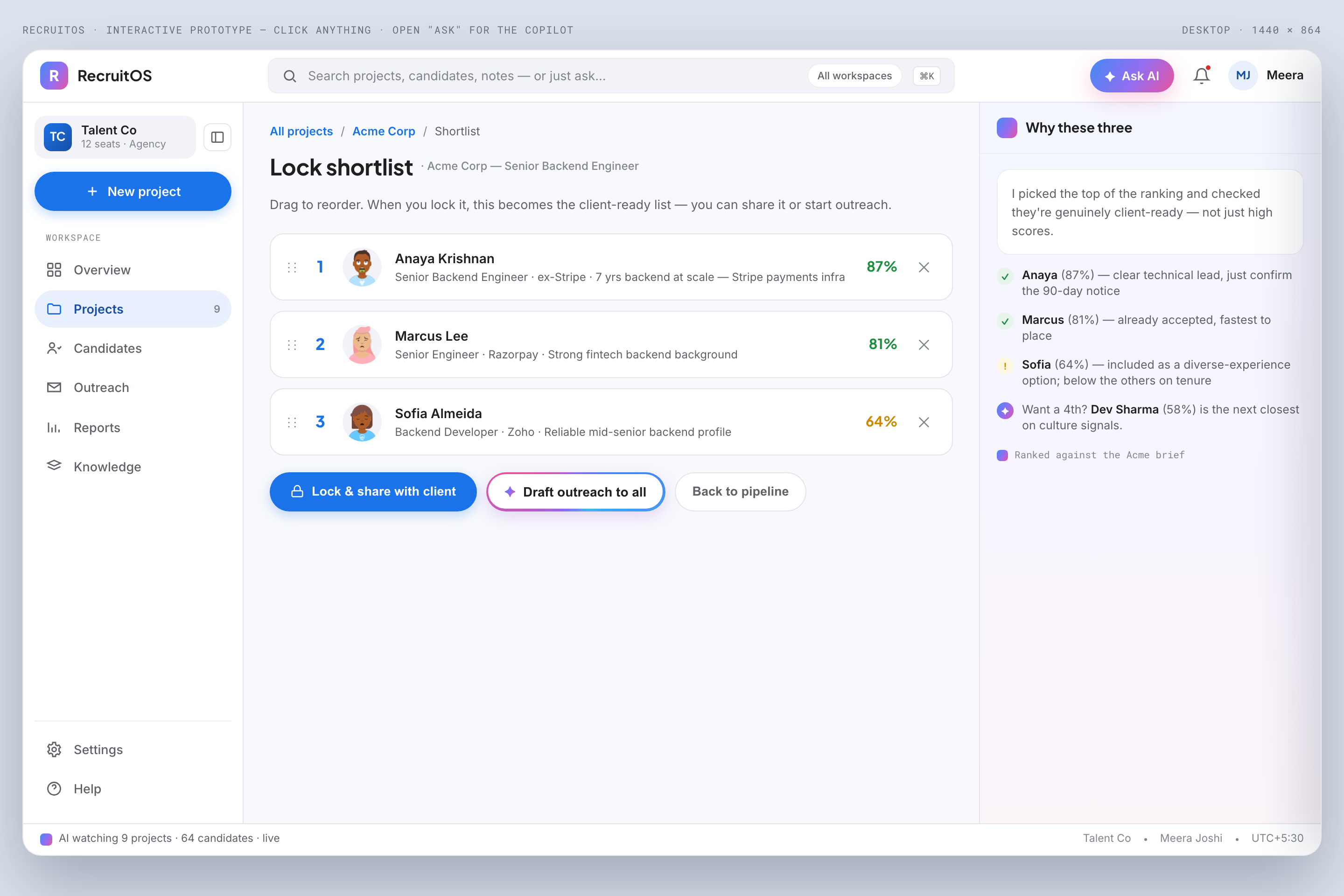
Shortlist & compare
Curate the AI ranking into a shortlist and compare candidates side by side. It's the side-by-side view recruiters do in their heads, made real.
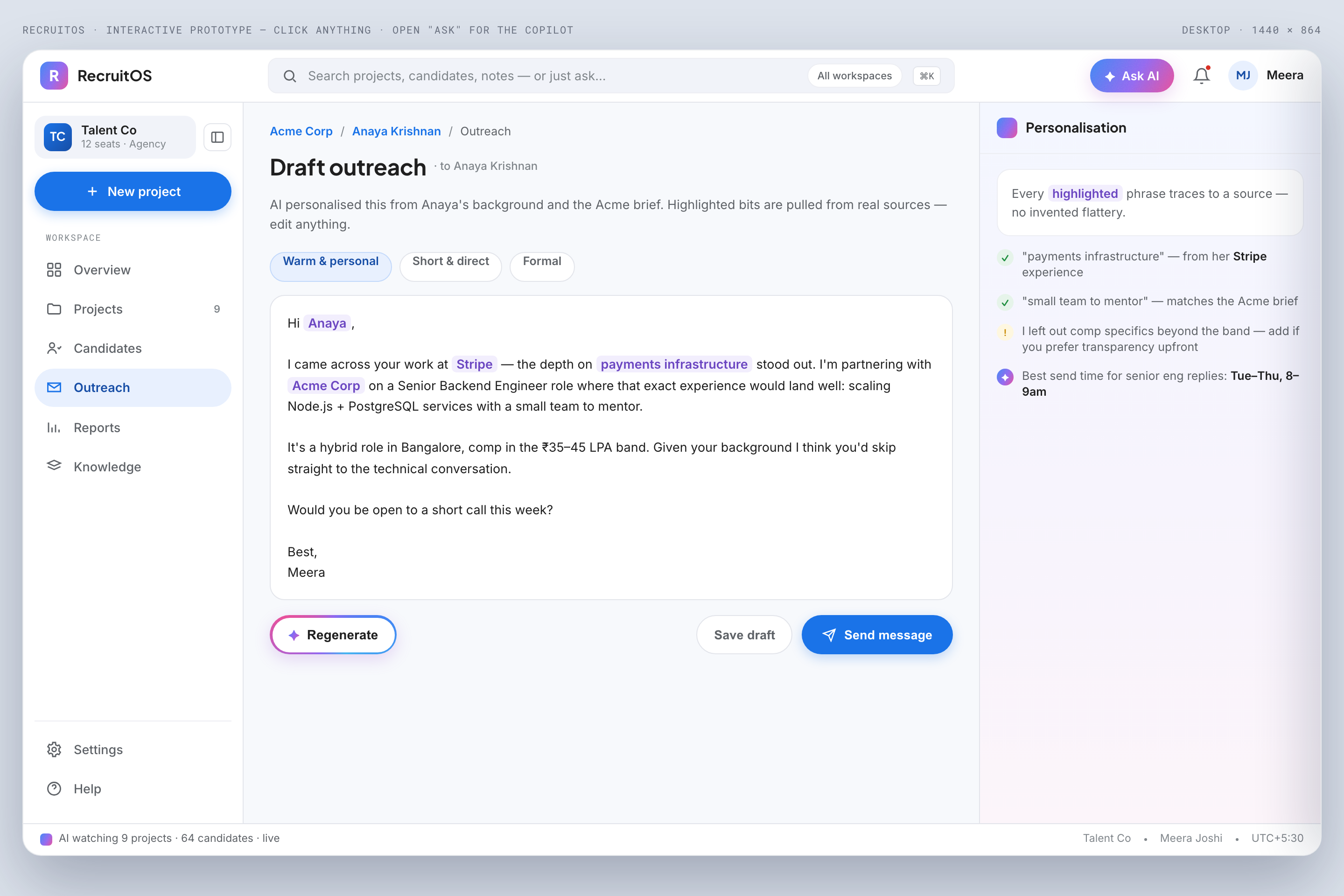
AI outreach composer
AI drafts a personalised message; the recruiter edits and sends. The human gate is explicit, so nothing goes out without a person behind it.
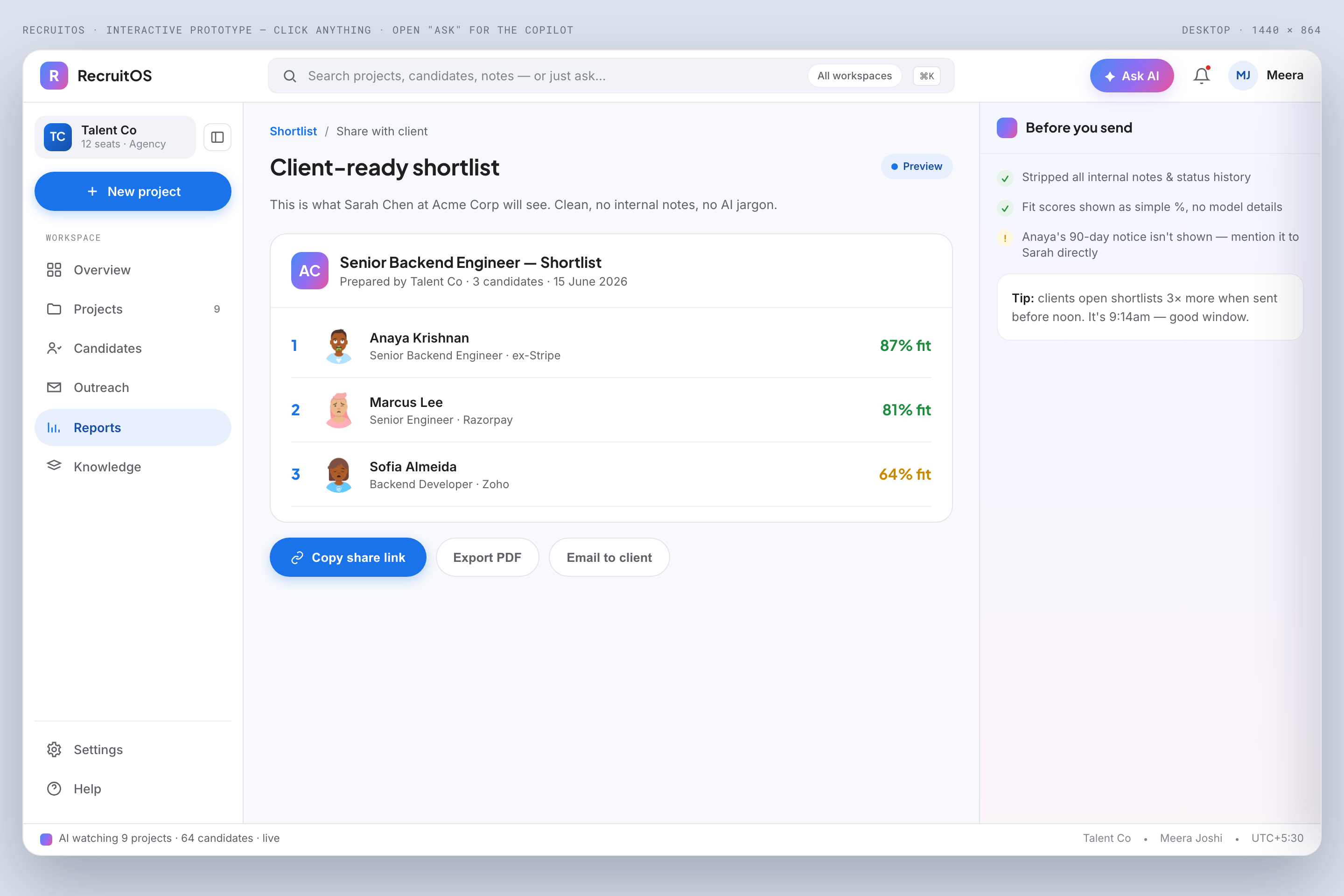
Client report
A one-click, client-ready status generated from project state, reviewed by the recruiter before it's shared. The Friday scramble, gone.
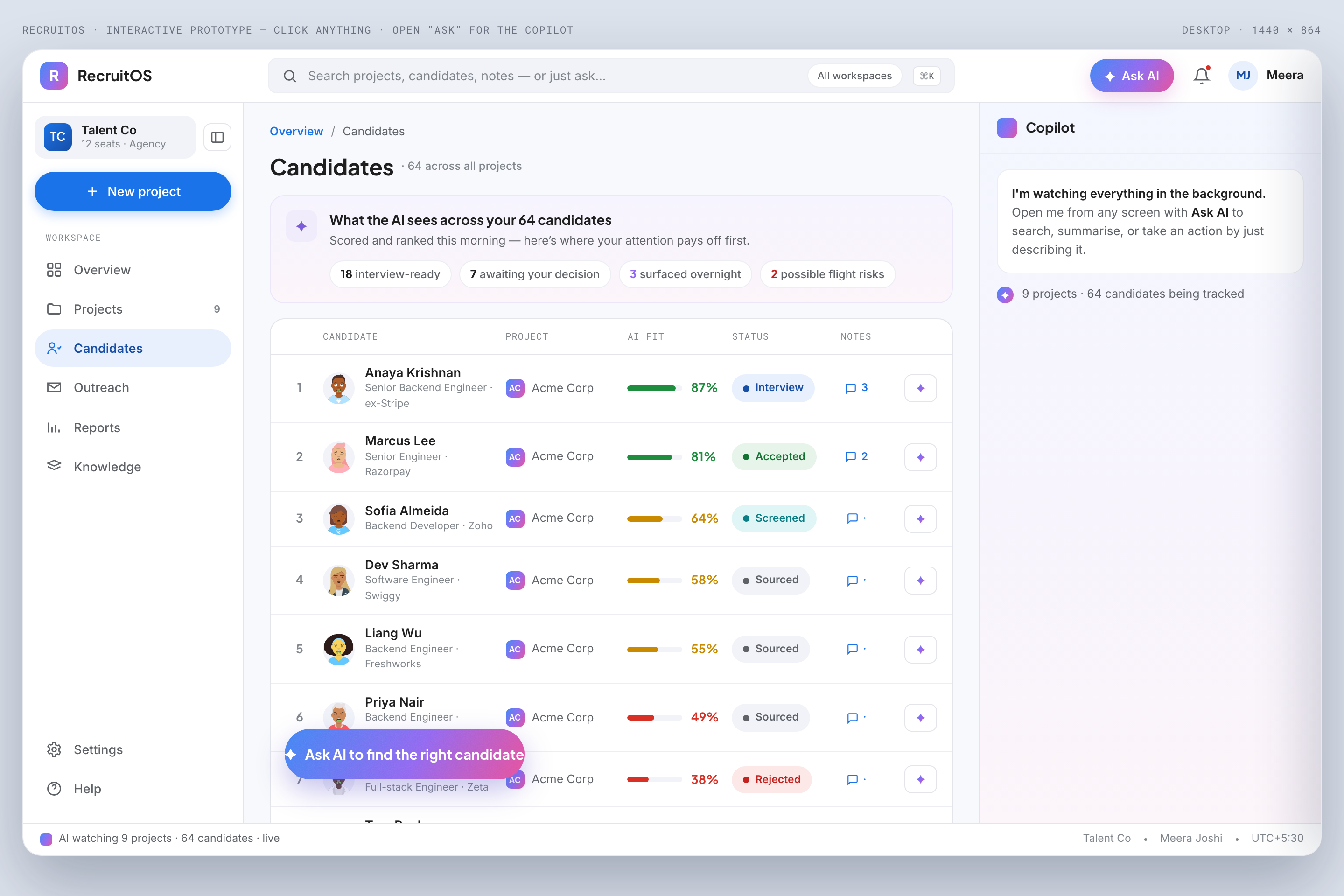
Candidates (cross-project)
The same ranked-table component, reused across the desk. One consistent way to read rank, fit, status, and notes everywhere it appears.
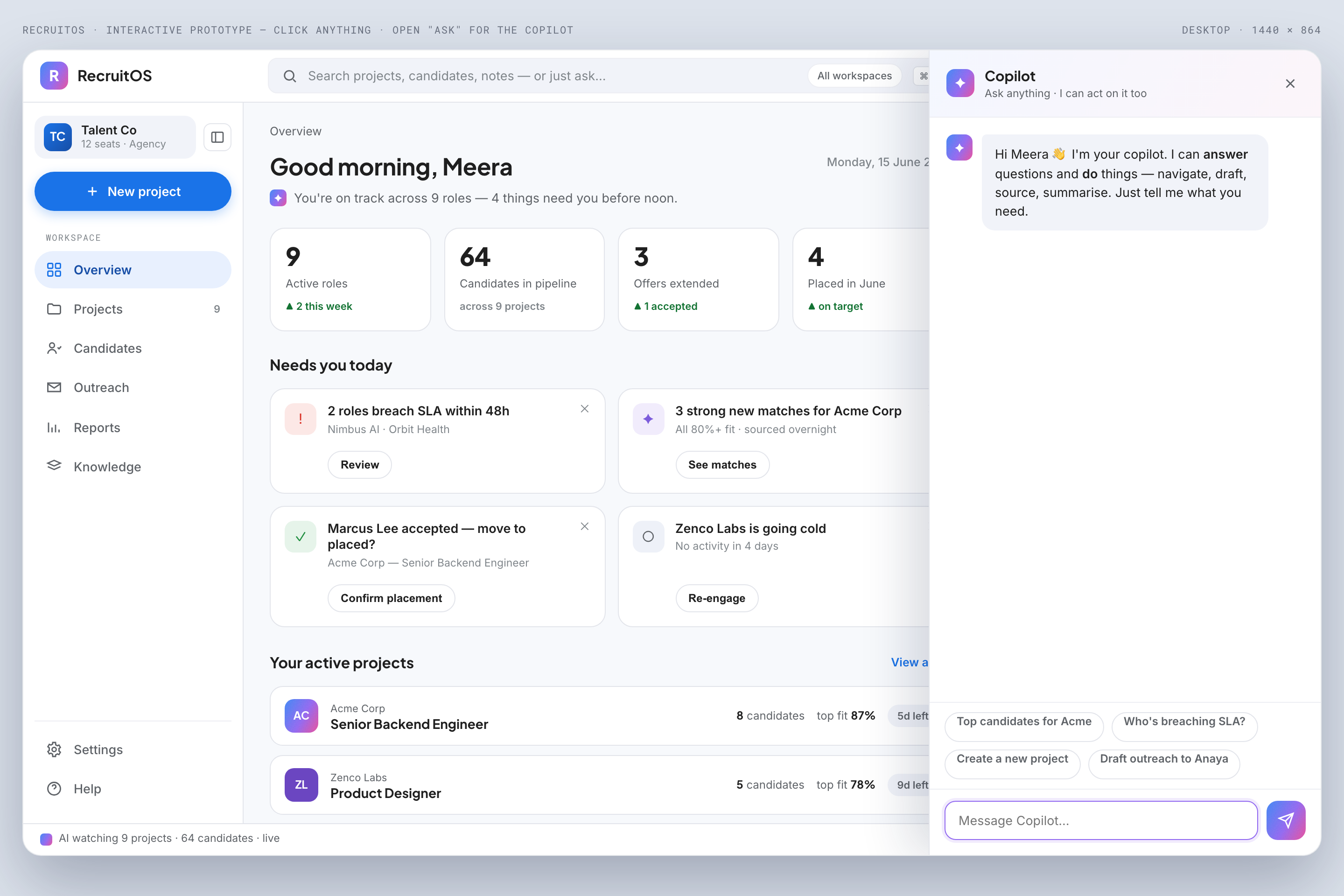
Ask-AI copilot
Natural-language search and actions across the whole desk. Ask in plain English, get an answer grounded in your projects, candidates, and notes.
Designing an AI recruiters will actually trust.
Recruiters have been burned by 'AI matching' before: black-box scores that surface the wrong people with total confidence. So the AI here earns its keep differently. It shows its work, and it never has the last word. Slate leans on a small set of AI-interaction patterns, applied consistently, so the AI feels like a transparent colleague rather than an oracle. Every pattern below appears in the prototype.
Confidence + provenance
Every AI output, whether a fit score, summary, or red flag, carries a confidence level and a clickable trail to the source it came from. The single most important trust move in the product.
Human in the loop
Consequential actions (send outreach, advance a candidate, share a report) are always gated behind a person. The AI proposes; the recruiter approves.
Progressive disclosure
AI reasoning starts collapsed and expands on demand. A glanceable answer for the fast path, the full 'why' one click away for when it matters.
Editable AI output
Nothing the AI writes is final. Drafts and summaries are starting points the recruiter shapes, keeping the human voice and judgement in the loop.
Graceful uncertainty
When the AI isn't sure, it says so: low-confidence states, 'not enough signal' messages, and honest gaps instead of confident-sounding guesses.
AI design decisions
A gradient reserved for AI
A Gemini-style gradient and the ✦ sparkle appear only on AI surfaces, so users always know, at a glance, when they're looking at a machine's output versus their own data.
Confidence as a chip, not a number dump
Confidence is shown as a calm high/medium/low chip with colour, not a false-precision percentage. It stays honest about the fuzziness without overstating it.
Provenance you can click
Every AI claim links back to the resume line, profile, or note it drew from, turning 'trust me' into 'check for yourself'.
Design system.
A recruiter's screen is dense: pipelines, cards, candidate detail, an AI panel, all at once. Slate uses a Google / Material-3 foundation, chosen deliberately so the product reads as calm, familiar, and enterprise-trustworthy, letting the AI moments stand out rather than the chrome. A single Gemini-style gradient is reserved exclusively for AI surfaces; everything else is restrained and functional. Plus Jakarta Sans for display, Inter for body, Roboto Mono for data and labels.
color foundations
typography scale
spacing scale (8pt grid)
design tokens
| Token | Value |
|---|---|
| color.surface.bg | #F7F9FC |
| color.ink.900 | #1F1F1F |
| color.brand.blue | #1A73E8 |
| gradient.ai | 120deg,#4285F4,#9168F0,#E8519B |
| radius.md | 12px |
| radius.lg | 20px |
| shadow.card | 0 1px 3px rgba(20,30,60,.08) |
| icon.ai | ✦ sparkle |
component library
A Material-grade component set, extended with the AI-specific pieces that make the product trustworthy. These are the patterns that carry the confidence-and-provenance language across the OS family.
system outcomes
The system is intentionally restrained so the AI layer carries the visual weight. Reserving one gradient and one icon (✦) exclusively for AI means a user can always tell, instantly, whether they're looking at their own data or the machine's interpretation of it. It's a trust decision encoded directly into the design tokens.
a shared OS-family base
Because Slate is the first of three planned concepts (Almanac and Crux follow), the foundation is built as a shared base: the same grid, spacing, motion, and AI-interaction patterns carry across all three, each taking its own accent within the AI-native language.
Where it stands.
Honest about what's proven and what isn't. Nothing here is claimed as measured. These are the targets the design is built to hit, and they'll be tested, not asserted.
What's done
- A researched, defined problem, reconstructed from public time-studies, recruiting communities, and tool reviews.
- A competitive teardown anyone can verify: ecosystem map, heuristic evaluation, and a capability scorecard.
- An end-to-end design: IA, three core task flows, wireframes, and a full AI-native design system.
- A working, clickable prototype of the core loop, the proof the design holds together as an experience.
What I'm designing toward
Targets to validate, not outcomes achieved.
Reclaim the admin time
The research says ~17 hrs/week per recruiter is reclaimable with AI (Bullhorn). The target is to win back a meaningful slice of that, to be measured with real recruiters, not assumed.
Trust the AI enough to use it
The success signal isn't a score; it's whether a recruiter acts on an AI suggestion after checking its provenance. That's a usability question, and the first thing I'd test.
Nothing lost when someone leaves
Whether organisational memory actually survives a departure is a longitudinal question, one for a pilot, not a prototype.
Future vision.
Slate is a concept I'd genuinely take further. Here's the path from where it is now to something real, and this is where the user-centred work I deliberately haven't done yet comes in, front and centre.
From concept to product
Validate with real recruiters
- →Contextual interviews with agency recruiters and owners. Watch a real desk for a day, pressure-test the project-centric model against how they actually work.
- →Usability testing of the prototype. Does the human gate feel safe or slow? Do recruiters trust a ranking once they can see its provenance? Where do they hesitate?
- →Concept testing of the AI-trust patterns: confidence labels, provenance links, the accept/edit/reject gate. That's the riskiest, most important part of the design.
Pilot with a few agencies
- →A small private beta with 5–10 independent recruiters, the beachhead the research points to.
- →Diary studies and real-workflow testing over weeks, not minutes. It's the only way to know whether the admin time actually comes back and the memory holds.
- →Measure the design targets from 'Where It Stands' against real use.
Build toward an MVP
- →The core loop the research validates: project workspace + AI candidate analysis/ranking + AI outreach + one-click client report.
- →Accessibility passes (WCAG), performance on real-world data, and the unglamorous edge cases that only show up in production.
Iterate from the field
- →Longitudinal trust studies, A/B testing on the AI patterns, and the steady loop of shipping and learning.
The honest summary
Slate today is a well-researched, fully-designed, prototyped concept. Making it real means putting it in front of the people it's for, and the plan for doing that, rigorously, is above. That's the next chapter, and I'd be glad to write it.
more concepts
the rest of the OS family →
thank you for reading.
Slate is a self-initiated concept. If you'd like to talk through the process, or where it goes next, I'd love to connect.